- Home
- About Us
- Our Team
- Our Courses
- Advance Program In Architectural Visualization
- Advance Programe in Animation Unreal Engine
- Advance Program In Animation & Visual Effects
- Advance Program in CGI Filmmaking
- Advance Program in Game Art Prototyping
- Advance Program in Game Art Specialization
- Advance Digital Graphics & Animation
- Digital Content Creation Program
- Arena Animation Specialist Program in Trinity
- GenAI Workflow for Storytelling
- Master in 2D Animation
- Master in 3D Maya
- Master in 3Ds Max
- Master in Blender
- Master in Unreal Engine
- Next-Gen Graphics & Web Development
- Next-Gen Visual Design & Motion Graphics
- UI/UX Advance Design
- Video Production & Content Creation
- Blogs
- Our Gallery
- Contact Us
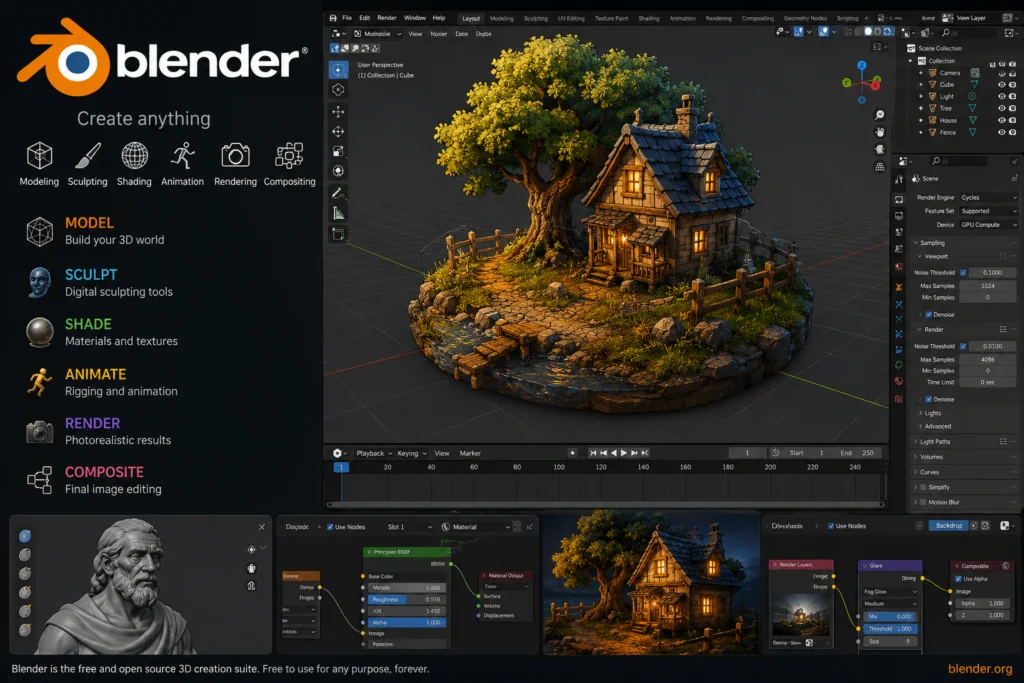
Master In Blender
Master in Blender is a practical 3D design and animation course designed for students who want to build skills in 3D modeling, texturing, lighting, animation, rendering, and visual storytelling using Blender.
Arena Animation Salt Lake offers the Master in Blender program as part of its creative and 3D learning portfolio.
What You Will Learn
- Introduction to the Blender interface and tools
- 3D Modeling Concepts and Techniques
- UV Mapping and Texturing
- Materials and Shading
- Lighting Techniques
- 3D Animation and Keyframing
- Rendering and Post-Processing
- Creating portfolio-ready 3D projects
The course focuses on the complete Blender workflow—from creating a 3D model to adding textures, lighting the scene, animating objects, and producing high-quality renders.
Course Details
| Course Information | Details |
|---|---|
| Course Name | Master in Blender |
| Duration | 132 Hours |
| Terms | 1 Term |
| Class Pattern | 2 hours per day, 3 days a week |
| Eligibility | Class 10 and above |
| Software | Blender |
| Certification | Certification of Accomplishment |
These details are based on the current published course information and may vary by centre or batch.
Why Choose Master in Blender?
Blender is a powerful open-source 3D software used for animation, gaming, product visualization, architectural visualization, motion graphics, and digital content creation. Students can develop practical skills and create projects for their professional portfolio.
Create. Animate. Render. Build Your 3D Career with Master in Blender at Arena Animation Salt Lake.
Duration: 528 Hours
Software/Tools Covered
- Select Tool – Select objects and mesh elements.
- Move Tool – Change the position of objects.
- Rotate Tool – Rotate objects in different directions.
- Scale Tool – Increase or decrease object size.
- Transform Tool – Move, rotate, and scale using one tool.
- 3D Cursor Tool – Set the position for adding objects or changing pivot points.
- Box Select Tool – Select multiple objects using a rectangular area.
- Circle Select Tool – Select objects or mesh parts using a circular area.
Career Profile
Concept Artist | Character Designer | 3D Modeler | Texturing Artist | Lighting Artist | 3D Animator | Rigging Artist | 3D Generalist | 3D Designer | Compositor Matchmove Artist | VFX Generalist | FX Artist | Motion Graphics Artist | Matte Painter | Video Editor | Roto Artist
- Advance Digital Graphics & Animation
- Advance Programe in Animation Unreal Engine
- Advance Program In Visual Effects
- Specialist Programe in Trinity (AVG)
- Advance Program In Architectural Visualization
- Advance Program In Animation & Visual Effects
- Advance Program in CGI Filmmaking
- Digital Content Creation Program
- Next-Gen Visual Design & Motion Graphics
- UI/UX Advance Design
- Next-Gen Graphics & Web Development
- Video Production & Content Creation
- Advance Program in Game Art Specialization
- Advance Program in Game Art Prototyping
- GenAI Workflow for Storytelling
- Master in 2D Animation
- Master in Blender
- Master in Unreal Engine
- Digital Architecture & Interior Design
- Master in 3Ds Max
- Master in Maya